

Best Desk Organizers for Home Office Productivity
Editorial TeamTable of Contents
- Quick Comparison: Best Desk Organizers for Home Office Productivity
- How We Evaluated These Desk Organizers
- 1. 3-Tier Desk Organizer with Drawers: Best Overall Value
- 2. Plastic Desk Organizer with Drawer: Best for Large Storage Capacity
- 3. Clear Desktop Storage Box with Drawers: Best Desktop Organizer with Drawers for Visibility
- 4. Rotating Desktop Pen Holder: Best for Pen and Stationery Storage
- The Best Desk Organizer for Small Desk Setups
- Cable Management for Desk Setups: Keeping Chargers and Cords in Check
- How to Organize a Home Office Desk in Four Steps
- Frequently Asked Questions
Last Updated: October 21, 2026
Quick Comparison: Best Desk Organizers for Home Office Productivity
The best desk organizers for home office productivity solve a specific problem: they keep the tools you reach for most within arm's reach while clearing visual clutter from your line of sight.
A desk organizer is a storage tray, caddy, or drawer unit that groups small office supplies into defined compartments so paperwork, pens, and devices stop drifting across your work surface.
Here is the short version before we break each one down:
| Organizer | Price | Best For | Storage Type |
|---|---|---|---|
| 3-Tier Desk Organizer with Drawers | $19.44 | Most home offices | Open tiers plus drawers |
| Plastic Desk Organizer with Drawer | $40.98 | Heavy supply loads | Large-capacity compartments |
| Clear Desktop Storage Box with Drawers | $21.16 | Shared and rental spaces | Transparent pull-out drawers |
| Rotating Desktop Pen Holder | $24.50 | Pen and stationery storage | Rotating upright sections |
Below, we walk through how we evaluated each pick and where each one earns its place on your desk.

How We Evaluated These Desk Organizers
We judged every desk organizer on four criteria: storage capacity relative to desk footprint, compartment flexibility, material durability, and price per usable compartment.

A common mistake is buying for maximum capacity instead of daily access. A unit that holds everything but forces you to unstack trays to reach a pen costs you time every hour. We favored organizers that separate high-frequency items from occasional ones.
1. 3-Tier Desk Organizer with Drawers: Best Overall Value
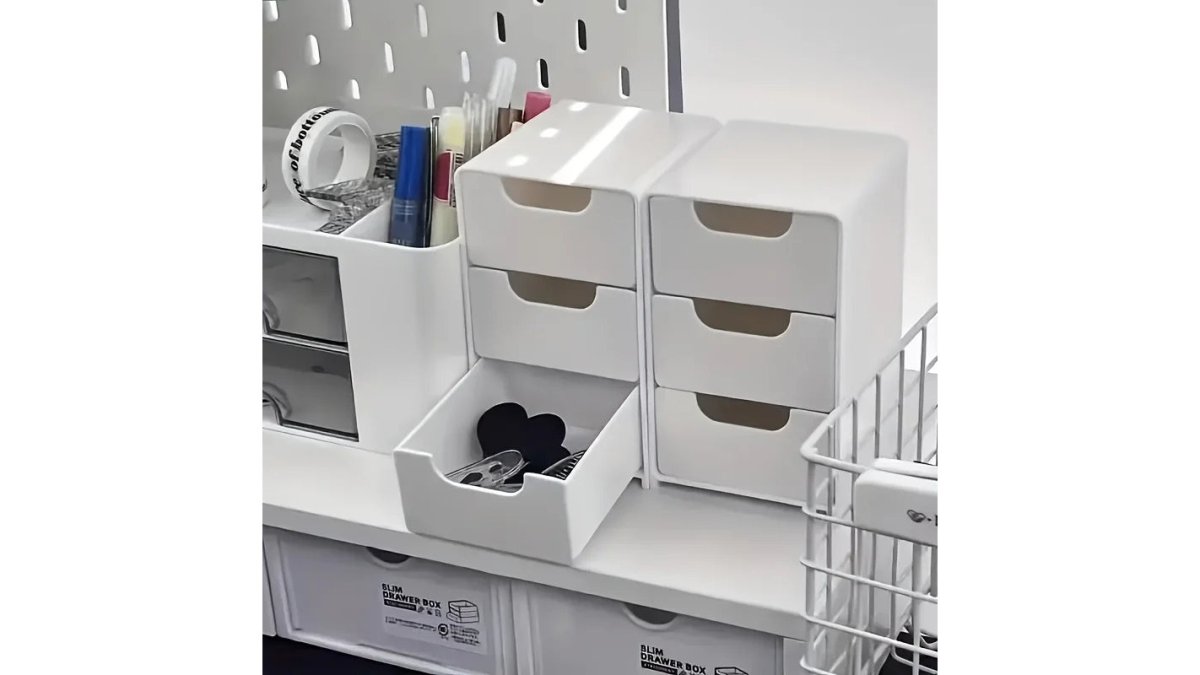
Our top pick for most home offices is the 3-Tier Desk Organizer with Drawers at $19.44. It combines three open tiers with a drawer section, so you get display storage and concealed storage in one compact footprint.
What It Holds and How It Fits
The open tiers suit items you want to grab without thinking: a notepad, a phone, sticky notes, small office accessories.
Where it falls short: three tiers add height. On a shallow desk or under a low shelf, check your clearance first. For the price, though, nothing else here matches the mix of open and closed storage.
2. Plastic Desk Organizer with Drawer: Best for Large Storage Capacity
If your desk is a supply depot rather than a minimalist surface, the Plastic Desk Organizer with Drawer at $40.98 is the capacity leader in this group.
The trade-off is footprint. Large capacity means a larger base, which is why we would not put this on a narrow writing desk. It suits a dedicated home office with a wide surface, or a shared workspace where several people pull supplies from one central unit.
3. Clear Desktop Storage Box with Drawers: Best Desktop Organizer with Drawers for Visibility
The Clear Desktop Storage Box with Drawers at $21.16 answers a question most organizers ignore: what if you need to see what you own?

It measures 25 by 17 by 7.5 centimeters and is made of PP plastic, so it stays low on the desk and slides under a monitor riser or shelf.
The limitation is capacity. This is a desktop organizer with drawers for small sundries, not a filing solution.
4. Rotating Desktop Pen Holder: Best for Pen and Stationery Storage
Pens are the hardest office supply to store well. The Rotating Desktop Pen Holder at $24.50 solves this with a rotating base and multiple upright sections, so you spin to the tool you need instead of digging.
The PP plastic construction keeps it light enough to turn smoothly, and the large-capacity design holds more than a standard pen cup. For anyone who works with pens, markers, or drafting tools all day, this is the most efficient use of a small patch of desk.
The Best Desk Organizer for Small Desk Setups
For a small desk, the best desk organizer for small desk setups is the Clear Desktop Storage Box with Drawers, because its 25 by 17 centimeter base uses vertical drawer space instead of spreading outward. When surface area is the constraint, stack upward, not sideways. But the pick matters less than the layout around it, and that is where most small-desk advice stops short.
Start with the ergonomic envelope, not the organizer
Before you buy anything, define the zone your body actually needs. A common pattern among ergonomics guidance is to keep the items you touch every hour within a forearm's reach of your seated position, and to keep the primary working area directly in front of you clear.
3-Tier Desk Organizer with Drawers →
A practical way to test placement: sit down, rest your forearms on the desk, and mark where your hands naturally land. Anything you reach more than a few times an hour should sit inside that arc. Everything else moves up or off the surface.
Three rules for compact desks
- Choose drawer units over open trays, since drawers use height rather than width.
- Keep one organizer maximum on the working surface; move overflow to a shelf.
- Mount or hang what you can, including monitors and lighting, to free the base layer.
Match the setup to how you actually work
A single recommendation rarely fits every small-desk worker. Use the organizer that matches your dominant task:
- Paper-heavy work: a low-profile drawer unit paired with a slim file tray, stacked vertically rather than side by side, so documents have a home without eating width.
- Remote meetings: keep the camera-facing edge of the desk clear and put the organizer to the side or behind the laptop, so a caddy does not appear in your video frame. A rotating pen holder works well here because it occupies a small footprint and keeps pens out of the camera's view.
- Creative work: open tiers beat closed drawers for tools you swap constantly, such as markers, rulers, and cutting tools, because visibility shortens the reach-and-search cycle.
Shared and multipurpose spaces
If you work from a kitchen table or a shared desk, portability matters as much as size. A light, low-profile unit you can lift into a drawer at the end of the day beats a beautiful caddy you have to clear every evening. Look for units under a few pounds with no attached lid or hinge, since those are the ones that survive being moved daily.
Cable Management for Desk Setups: Keeping Chargers and Cords in Check
Cable management for desk setups starts with containment, not tying. Route each charger and cord to a fixed point, then store the slack in one closed compartment so the surface stays clear. Loose cables are the fastest way to undo a tidy workspace, and they are also the item most organizer roundups ignore entirely.
Separate the three cable problems
Most people treat cables as one problem. They are actually three, and each needs a different fix:
- Power cables that run from the wall or a power strip to your devices. These should be routed once and left alone.
- Charging cables you plug and unplug daily. These need to be reachable without crawling under the desk.
- Data and peripheral cables for monitors, keyboards, and drives. These should be bundled and kept out of the way of your feet and your paperwork.
A drawer organizer handles the second category well. The first and third belong to routing hardware, not desk trays.
A practical routine
- Label each charger with a small tag so you never unplug the wrong one
- Coil slack into a drawer compartment rather than across the desk
- Keep one charging zone at the desk edge, away from your typing area
The drawer sections on the 3-Tier and Clear Desktop units handle this well. Coiled cables belong out of sight, and a closed drawer keeps them from snagging on paperwork.
Where devices and chargers actually go
A desk organizer is not a charging station, and treating it as one creates heat and tangling problems. A better pattern is to separate the two functions:
- Phones and tablets belong on an open tier or a dedicated stand at the desk edge, where you can see notifications without picking the device up.
- Chargers and power bricks belong in a closed drawer or mounted under the desk, not in an open tray where they collect dust and clutter.
- Cable slack belongs coiled and secured, not loose. A simple hook-and-loop tie per cable is enough; avoid permanent zip ties on cables you may need to reroute.
The trade-offs most guides skip
Closed drawers hide cables but trap heat, so do not store an actively charging power brick in a sealed compartment for long periods. Open trays keep cables visible but collect dust and look messy. The compromise most home offices settle on is a closed drawer for spare cables and adapters, plus one open, reachable spot for the cable you are using right now.
When to add routing hardware
If you have more than three or four devices, a drawer organizer alone will not fix the cable problem. Add a cable tray or under-desk basket for the power strip and power bricks, and route the daily charging cables up to the desk surface from there. That keeps the surface clear while leaving the heavy, rarely moved hardware out of sight.
How to Organize a Home Office Desk in Four Steps
Organizing a home office desk takes about an hour and follows a simple sequence: empty the surface, group supplies by how often you use them, assign each group a compartment, then return only the daily items to the desk.
- Clear everything off the surface. Sort into daily, weekly, and rare-use piles.
- Match storage to frequency. Daily items go in open tiers or a pen holder; rare items go in drawers.
- Place the organizer within arm's reach. Your dominant hand side is the natural spot.
- Set a reset ritual. Two minutes at the end of each day keeps the system working.
That last step matters more than the organizer you buy. A desk stays clutter-free because of a habit, not a product.
Frequently Asked Questions
What desk organizer is best for a home office?
It depends on how much you store. For most home offices, a tiered unit with drawers covers pens, notepads, and small accessories in one footprint. The 3-Tier Desk Organizer with Drawers at $19.44 is the lowest-cost way to get vertical storage plus closed drawers. If you keep more supplies, the Plastic Desk Organizer with Drawer at $40.98 holds more per square inch. Match the organizer to what you actually use daily, not to a wishlist of supplies.
How can desk organizers improve productivity?
A fixed spot for every tool removes the small pauses that add up during a workday: hunting for a pen, digging for a charger, shuffling papers to find a notepad. When pens live in a rotating holder and small items sit in drawers, your hands go to the same place every time. The bigger gain is visual: a clear desk surface leaves room for your laptop and a notepad, which keeps attention on the task instead of the clutter around it.
How do I organize a small home office desk?
Build upward, not outward. A compact drawer unit like the Clear Desktop Storage Box with Drawers, which measures roughly 9.8 by 6.7 by 3 inches, adds storage without eating much desk footprint. Put the items you touch hourly on top, and everything else inside drawers. Keep one pen holder instead of three, and route cables along the back edge so they do not cross your working area. Clearing the surface matters more than adding containers.
Are desktop organizers better than desk drawers?
They solve different problems. Built-in desk drawers hide clutter but force you to open and close them all day, and small desks often have none. A desktop organizer with drawers keeps frequently used items within arm's reach and adds storage a bare desk lacks. Many people use both: desktop organizers for daily tools, built-in drawers for archived paperwork and rarely used supplies. If your desk has no drawers at all, start with a desktop unit.
How can I keep cables organized on my desk?
Start by reducing what is plugged in. Route one charging cable to a fixed spot at the back corner of the desk and anchor it there, so it does not slide into your working area. Coil excess cable and secure it with a clip or tie rather than letting it pool on the surface. Keep chargers and small devices in a drawer or a dedicated compartment so the desktop itself stays clear. A tidy cable run makes the biggest visible difference after decluttering.
A tidy desk is a productivity decision, not a decorating one, and the right storage makes the habit easy to keep. PracticalHomeEssentials.com stocks the organizers in this guide, including the 3-Tier Desk Organizer with Drawers, the Plastic Desk Organizer with Drawer, and the Clear Desktop Storage Box with Drawers, all with free shipping available and home delivery. Start with the unit that matches your desk size, and build from there.