

9 Affordable Cable Management Solutions for Desks in 2026
Editorial TeamLast Updated: October 25, 2026
Quick Summary
Affordable cable management means routing and hiding desk cords with low-cost hardware, and a single under-desk tray handles most of the mess. Most shoppers should budget roughly $45-$80 for a standard setup of a tray, a cable sleeve, and clips. Price the tray first, then add only pieces that solve a problem it cannot.
- A minimal fix with one under-desk tray plus reusable ties costs roughly $25-$45.
- A tray should span at least half your desk's width to hold a full power strip.
- Screw mounting holds firm on wood and metal, while adhesive suits glass and laminate.
- Never plug one power strip into another, as it overloads the first strip and defeats its breaker.
- Start with the tray or box that holds your power hub, then add clips and a sleeve.
Table of Contents
- What Affordable Cable Management Actually Costs in 2026
- The Real Price of Each Solution Type
- Why an Under-Desk Cable Management Tray Does the Most Work
- Cable Management Clips for Desk Edges and Charging Cables
- No-Drill Cable Management That Still Holds
- When a Cable Management Box Beats a Tray
- Matching a Solution to Your Desk Type and Material
- Building Your Cable Management Setup
- Frequently Asked Questions
What Affordable Cable Management Actually Costs in 2026
Affordable cable management is the practice of routing, bundling, and hiding desk cords using low-cost hardware that installs in minutes.
Here's the tension nobody talks about. Cable clutter is not a storage problem. It's a routing problem.
Below, we break down what each solution type actually costs, which ones earn their price, and how to match a fix to your desk.
The Real Price of Each Solution Type
Prices swing widely within each category, so compare by function, not by sticker. The table below gives typical price bands, but the number that actually matters is cost per cable managed and total setup cost.
| Solution | Typical Price Band | Cables or Items It Holds | Approx. Cost per Cable | Best For |
|---|---|---|---|---|
| Under-desk tray | $20-$100 | Power strip + 6-12 cables | $2-$8 | Most desks |
| Cable clips | $8-$20 | 3-6 cables | $2-$5 | Desk edges, charging leads |
| Cable sleeve | $10-$25 | Bundles of 4-8 cables | $2-$4 | Monitor and peripheral runs |
| Cable box | $20-$45 | Power strip + 4-8 plugs | $3-$8 | Floor-level mess |
| Reusable ties | $6-$15 | Loose bundles of 3-10 | $1-$3 | Quick fixes, temporary routing |
| Raceway / J-channel | $15-$40 | Wall-to-desk runs of 2-6 cables | $4-$12 | Long distances, rented walls |
Cost per cable is a rough yardstick, not a spec sheet. It assumes the organizer is used near its stated capacity, and it exposes the quiet trap in budget cable gear: the cheapest unit per piece is often the most expensive per cable because it holds so little.
What a Realistic Total Setup Actually Costs
Most desks do not need every category. A typical home-office setup, one monitor, a laptop, a phone charger, and a power strip, usually lands in one of three tiers:
- Minimal fix, roughly $25-$45: one under-desk tray plus a pack of reusable ties. This handles the power strip and the bulk of the cable runs.
- Standard setup, roughly $45-$80: a tray, a cable sleeve for the monitor run, and a pack of clips for daily charging cables. This is the tier most shoppers should budget for.
- Full concealment, roughly $80-$150: a tray, a box for a floor-level power strip, a sleeve, clips, and a raceway for a wall-to-desk run. Only worth it if the desk sits away from the wall or the outlet is badly placed.
A common mistake is buying five small organizers instead of one tray. The total often lands higher than a single well-sized tray, and you still have loose cords. Price the tray first, then add only the pieces that solve a problem the tray cannot.
Where Cheap Options Quietly Fail
Budget gear fails in predictable places, and knowing them is how you avoid paying twice:
- Adhesive that gives up. Inexpensive adhesive clips and mounts often release within weeks on dusty, textured, or slightly curved surfaces. Screw-mounted trays avoid this entirely.
- Thin plastic that sags. Low-cost trays with thin walls bow under a power strip's weight, especially in longer lengths. Look for reinforced ribs or a metal build if the tray spans more than about 16 inches.
- Undersized channel depth. A tray deep enough for cables but not for a power strip plus adapters forces you back to the floor. Measure the strip's height before ordering.
The pattern is clear. Trays and boxes do the heavy lifting. Clips and ties are cheap add-ons that finish the job, but only after the main hub is off the floor.
Why an Under-Desk Cable Management Tray Does the Most Work
An under-desk cable management tray is a slim, slotted channel that mounts beneath the desktop and holds your power strip, adapters, and excess cable runs off the floor.
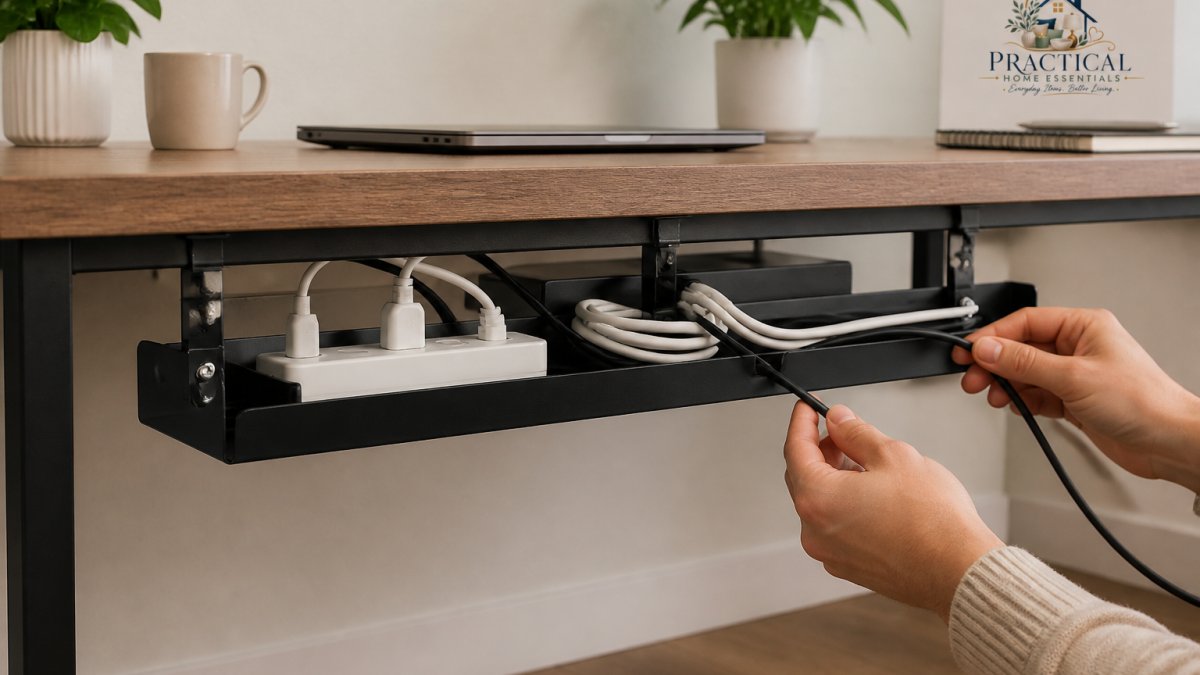
Most desks fail at the same point: the power strip sits on the floor, and every device cable droops toward it.
For a tray that screws into wood or metal and comes in four lengths, our Ascrono® CableCare Tray covers a single desk or a full office run.

What to Check Before You Buy a Tray
Fit matters more than brand. Check these before ordering:
- Length vs. desk width: a tray should span at least half your desk's width to hold a full power strip.
- Mounting type: screw mounting holds firm on wood and metal; adhesive suits glass and laminate.
- Channel depth: deep enough for a power strip plus adapters, not just cables.
Watch out: an oversized tray on a small desk can block legroom or hit a drawer. Measure the underside before you commit.
Cable Management Clips for Desk Edges and Charging Cables
Cable management clips for desk edges are small adhesive or screw-mounted holders that keep charging cables within reach instead of sliding off the desk.
The job is simple: stop the daily fishing expedition for a dropped charging cable.
Two rules keep clips working. Clean the surface before sticking adhesive clips, and don't overload a single clip with more than one or two cables. Adhesive fails fast under weight.
No-Drill Cable Management That Still Holds
No-drill cable management uses adhesive mounts, clamp-on clips, and tension-held sleeves to secure cords without putting a screw in your desk.
The trade-off is honest: adhesive holds well on clean, smooth surfaces and poorly on dusty or textured ones. Clean with rubbing alcohol, let it dry fully, then press the mount for a slow count of thirty.
For heavier loads like a power strip, no-drill options get shaky. That's when a screw-mounted tray wins.
When a Cable Management Box Beats a Tray
A cable management box is a lidded container that hides a power strip and its plugs at floor level or behind a desk.
Boxes suit setups where the power strip has to stay on the ground. They also hide bulky adapters that won't fit in a slim tray.
The catch is ventilation. A box traps heat, so don't cram it with high-draw chargers and seal the lid.
Matching a Solution to Your Desk Type and Material
The right fix depends on what your desk is made of, how thick the top is, and how much room sits underneath. The same tray that transforms a solid-wood desk can crack a glass top or block the crossbar of a standing desk. If you are still planning the desk itself, see How To Build A Standing Desk On A Budget.
Solid Wood and Laminate Tops
Solid wood and thick laminate are the easiest surfaces. A screw-mounted under-desk tray holds firm, carries a full power strip, and does not depend on adhesive. Check the underside for a center support or modesty panel before drilling, and keep screws short enough that they do not break through the top. Laminate takes screws well but can chip at the hole; a pilot hole prevents splitting.
Glass, Thin, and Hollow-Core Tops
Glass tops and thin or hollow-core desktops are where screw mounting goes wrong. Glass can crack under a drilled hole or a clamp tightened too far, and hollow-core tops have little material for threads to bite. Use adhesive mounts or clamp-on clips rated for the surface, and keep heavy loads like power strips off the glass entirely, route them to a floor box or a tray mounted to the desk frame instead.
Standing Desks
Standing desks add two constraints: the top moves, and the frame often has a crossbar or motor housing underneath. A tray must clear the crossbar through the full height range and must not pinch cables where the desk meets the wall. Leave a service loop of slack at the moving joint so cords flex instead of pulling. Clamp-on trays that grip the desktop edge are a common no-drill choice for standing desks, but confirm the clamp fits the top's thickness and does not interfere with the height-adjustment mechanism.
Rented Spaces and No-Drill Desks
When drilling is not allowed, adhesive mounts, clamp-on clips, and tension-held sleeves are the practical options. Adhesive holds well on clean, smooth surfaces and poorly on dusty or textured ones. Clean with rubbing alcohol, let it dry fully, then press the mount for a slow count of thirty. For heavier loads like a power strip, no-drill options get shaky, that is when a clamp-on tray or a floor box wins.
Small Desks and Tight Undersides
A small desk rewards compact, vertical solutions over long trays. An oversized tray can block legroom or hit a drawer that opens beneath the desk. Measure the underside before you commit: tray length should span at least half the desk's width to hold a full power strip, but on a narrow desk a shorter tray plus a sleeve for the monitor run often fits better than one long channel.
Safety, Ventilation, and Electrical Load
Cable gear should never trap heat or strain a cord. Keep these in mind:
- Ventilation: a closed box traps heat, so do not cram it with high-draw chargers and seal the lid. Leave the vents clear and keep the box off carpet where possible.
- Power-strip placement: mount the strip so its cord is not pulled taut and its outlets face away from heat sources. Do not coil the strip's cord tightly; loose loops shed heat better.
- No daisy-chaining: never plug one power strip into another. It overloads the first strip and defeats its breaker.
Building Your Cable Management Setup
Start with the biggest mess, not the smallest. Unplug everything, sort cords by device, and mount the tray or box that holds your power hub first. For broader ideas to complete the workspace, browse Best Desk Organizers Home Office Productivity.
That order keeps your spending focused. Most setups need one tray, a handful of clips, and a sleeve, not a cart full of gadgets.
Frequently Asked Questions
What is the cheapest way to organize cables under a desk?
Adhesive cable clips and reusable cable ties are the lowest-cost starting point, usually a few dollars for a pack, and they handle the cables you unplug most often. A basic under-desk tray costs more but gets the power strip and the bulk of the bundle off the floor in one move. Most people end up combining a tray with clips: the tray holds the permanent wiring, and the clips keep the charging cable within reach on the desktop edge.
How can I hide cables on a desk without drilling?
No-drill cable management relies on adhesive-backed clips, sleeves, and raceway channels that stick to the underside or back edge of the desk. Clean the surface with rubbing alcohol and let it dry fully before applying, because dust and oils are the main reason adhesive fails. Clamp-on trays and baskets that grip the desk edge are another option. Keep in mind that adhesive holds best on smooth sealed surfaces and less well on textured or unfinished wood.
Are cable trays or cable boxes better for desk cable management?
A tray suits a desk with a power strip, a monitor cable, and several charging cords, because it mounts underneath and stays out of sight. A cable management box sits on the floor or desktop and is better for hiding a power strip with bulky adapters, since the enclosed shape contains the mess. Trays need mounting points; boxes need floor or desktop space. Many setups use a tray under the desk and a box at floor level for the surge protector.
Do adhesive cable clips work on desks?
They work well on smooth, sealed surfaces like laminate, painted metal, and finished hardwood. They hold poorly on textured, dusty, or unfinished wood, and they can lift paint if removed carelessly. Press each clip firmly for about 30 seconds and let the adhesive cure for a few hours before loading it with cable weight. For heavy bundles or a power strip, use a screw-mounted tray instead of clips.
Cable clutter is easy to ignore until it swallows your workspace. At PracticalHomeEssentials.com, we stock the pieces that fix it without a big spend, from a screw-mounted tray to a multi-port charger, all with free shipping available and a selection built for real home offices. Get started with PracticalHomeEssentials.com and clear your desk for good.
